Table of Contents
Since many players know the rules of how to play Wordle and color codes, the same thing applies in certain Wordle-solving tools. They also provide color-based input values where users have to enter their letters in the respective color field.
However, if you are unable to understand the input guess's color pattern, then worry not.
This guide explains how Wordle solver input works, how to interpret each color correctly, and how to use those signals to narrow down the answer faster.
Read till the end!
What a Wordle Solver Actually Does
A Wordle solver is not cheating magic. It simply filters possibilities based on information you already have from your guesses. Every guess gives clues. The solver reads those clues and removes impossible words from its list.
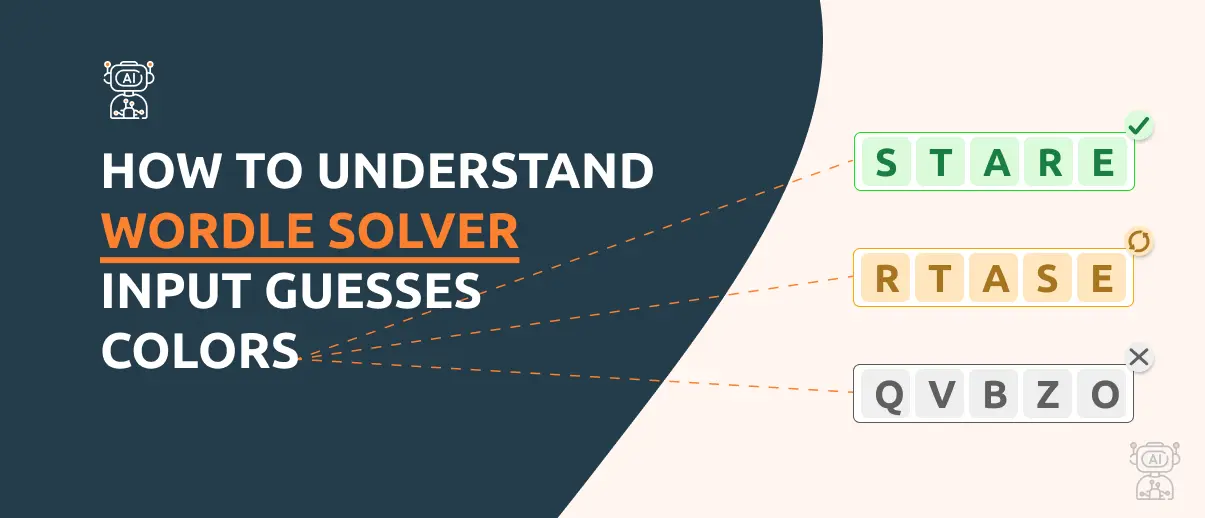
Think of it like a detective notebook. Each color acts as evidence. When a solver asks for "colors," it wants the exact feedback Wordle gave you. This means that if the letter “F” is colored in green, then you must enter it in the “Green Letters” field. By any chance, if you place a letter incorrectly, the tool will provide wrong suggestions.
The color codes of Wordle Solver
Similar to the official Wordle puzzle, Wordle Solver is also built in the same style to help players easily place specific letters in their respective fields. The green letters must be placed in a green field, the same goes for yellow letters, and grey ones.
Let’s understand this in more depth.
Green Tiles: Correct Letter, Correct Spot
A green tile means that this exact letter is in today’s answer word and placed on the correct spot.
When it comes to entering that letter in the Wordle Solver, make sure you place it in the correct spot. Take “E” as a green letter in the third place, so you must enter it in the third spot of the green field in Wordle Solver.
This helps the tool to filter out only those 5-letter words that contain “E” in the third spot, such as SCENT, BLENT, CREST, and more.

Yellow Tiles: Correct Letter, Wrong Spot
The second color of Wordle is yellow. This color tile indicates that the specific letter is part of today’s 5-letter answer word, but is placed in the wrong position.
However, in Wordle Solver, you can input that yellow letter in any of the five spots since it is misplaced. That way, the tool will try different word combinations and replace the yellow colored letter in different spots to find the exact match.
It is important to note that Wordle Solver will use that letter in every single 5-letter word, but in different places.

Gray Tiles: Letter Not Used
If the Wordle game changes the color of certain letters to grey, it means that they are not part of today’s Wordle answer word. Since a maximum of five letters can be used in the Wordle answer, the rest would turn out in grey color.
For example, if today’s answer word is “SCENT,” then the puzzle will color the rest of the 21 letters in grey (A, B, D, and F…).

With this, you can let Wordle Solver filter out words more precisely and find today’s answer word.
How Wordle Solvers Interpret Your Input
When you enter guesses and colors, the solver builds rules behind the scenes.
It performs three main actions:
-
Locks confirmed letters into fixed positions from green tiles
-
Tracks letters that must appear somewhere from the yellow tiles
-
Eliminates letters marked gray unless duplicates explain otherwise
Each new guess tightens the filter. The word list shrinks from thousands to dozens, then to only a few options.
A good solver does not predict randomly. It calculates which words still obey every color rule.
How to Use Wordle Solver Color Code for “Hard Mode”?
Hard Mode turns Wordle colors into strict rules instead of simple hints. Every new guess must follow what earlier colors revealed. A solver helps because it keeps track of those limits automatically.
Green Letters
Green tiles stay fixed. You must keep the same letter in the same position in every future guess. When entering solver colors, lock greens exactly where they appeared.
Yellow Letters
Yellow letters must be reused in the next guess, but in a different position. The solver uses this rule to rearrange letters instead of testing random ones.
Gray Letters
Gray letters usually mean remove them completely. Avoid using them again unless a duplicate letter situation explains the result.
Smart Hard Mode Strategy
Use solver suggestions that respect greens and yellows while still testing at least one new letter when possible. Hard Mode rewards careful placement, not random exploration.
In short, the Wordle “Hard Mode” is about refining positions step by step. Enter colors correctly, follow the rules, and the solver narrows the answer quickly.
Tips to Use Wordle Solver More Effectively
Some effective tips that can help you unleash the full power of Wordle Solver are:
-
Make sure to enter the green letters in the correct spot
-
Double-check yellow positions before submitting input
-
Watch for repeated letters in both guesses and results
-
Avoid emotional guessing because logic wins every time.
Playing Wordle well feels like peeling an onion. Each layer reveals new clarity.
Wrapping Up
Understanding Wordle solver colors changes the entire experience. Green locks certainty, yellow guides movement, and gray clears the noise. Once you treat colors as logical signals instead of decoration, the puzzle stops feeling random. Every guess becomes meaningful.
Enter colors carefully, think about letter placement, and let the information work for you. Wordle then shifts from trial and error into a satisfying mental challenge where each step makes sense, even when the answer hides in plain sight.
More to Read:

Meet the Author

Talha Zahid
CEO, AI Word Solver
Talha Zahid is the visionary CEO of AI Word Solver, a platform that leverages cutting-edge AI to revolutionize language processing. With a passion for technology and problem-solving, Talha focuses on developing AI solutions for complex word puzzles. An expert in SEO and digital strategy, he integrates content optimization into his work. Under his leadership, AI Word Solver sets new industry standards. Connect with him on LinkedIn.
OTHER SOLVER
Try out other advanced tools of AIWordSolver to become a master.


1. What a Wordle Solver Actually Does
2. The color codes of Wordle Solver
2.1. Green Tiles: Correct Letter, Correct Spot
2.2. Yellow Tiles: Correct Letter, Wrong Spot
2.3. Gray Tiles: Letter Not Used
3. How Wordle Solvers Interpret Your Input
4. How to Use Wordle Solver Color Code for “Hard Mode”?